War stories: VPS, puppet, x86-64 revisions
Last week, we finished our semester-long “OS basics” course with a lesson on managing servers using professional DevOps tools like Puppet. I thought it might be instructional to run on live internet servers rather than in a closed lab environment. So I tasked myself to create some VPS instances for the class. Just spin up 30 of them using an API and we're good to go.
What could go wrong?

Puppet rebellion
Preparing for the lecture, I reviewed my existing materials and made sure everything still works. The servers were to be running on CentOS. I noticed that CentOS Stream 10 was released, so I bumped the base OS to this version—a fact that will be important later. The exercise goes roughly like this:
- Get your SSH keys to the server
- Install Puppet agent on the server
- Configure services using puppet
Step 2 was where trouble began. Out of nowhere, I was getting an HTTP error 401 (not authorized) while getting my server to install the Puppet agent package. Such error is quite unexpected while downloading from a public repository, so what's going on?
Turns out Puppet repository is not so public anymore. Since early 2025, you are required to register yourself and obtain free credentials to download the packages. To download a build of an open-source program I now require credentials? Looking at this from any angle, I struggled to find rationale. And of course, registering anywhere would massively stand in the way of good learning experience in the class.
The Puppet folks try to explain themselves in an article named Our Plans for Open Source Puppet in 2025. But honestly, that article couldn't be more vague on what they are trying to accomplish and why.

Moves like this certainly don't do the company any favors in terms of community trust. Fortunately, the same community has not been passive to this. The OpenVox Automation Framework is a 1:1 copy of Puppet—so everything works the way it used to—except it doesn't require you to register just to download the packages. It's maintained by the Vox Pupuli community and aims to be a drop-in replacement for open-source Puppet.
Automation
This part was relatively painless. As soon as I had my prototype server figured out, I needed to prepare infrastructure for the whole class. Coming from an AWS cloud background, where programmatic infrastructure setup can be tedious, my VPS provider's API was refreshingly straightforward.
My AI partner created a simple Python tool that can create, delete, start and stop servers from the command line. Automating that is as simple as writing a for loop in bash. The script can even output a handy CSV file with the credentials to all the machines.
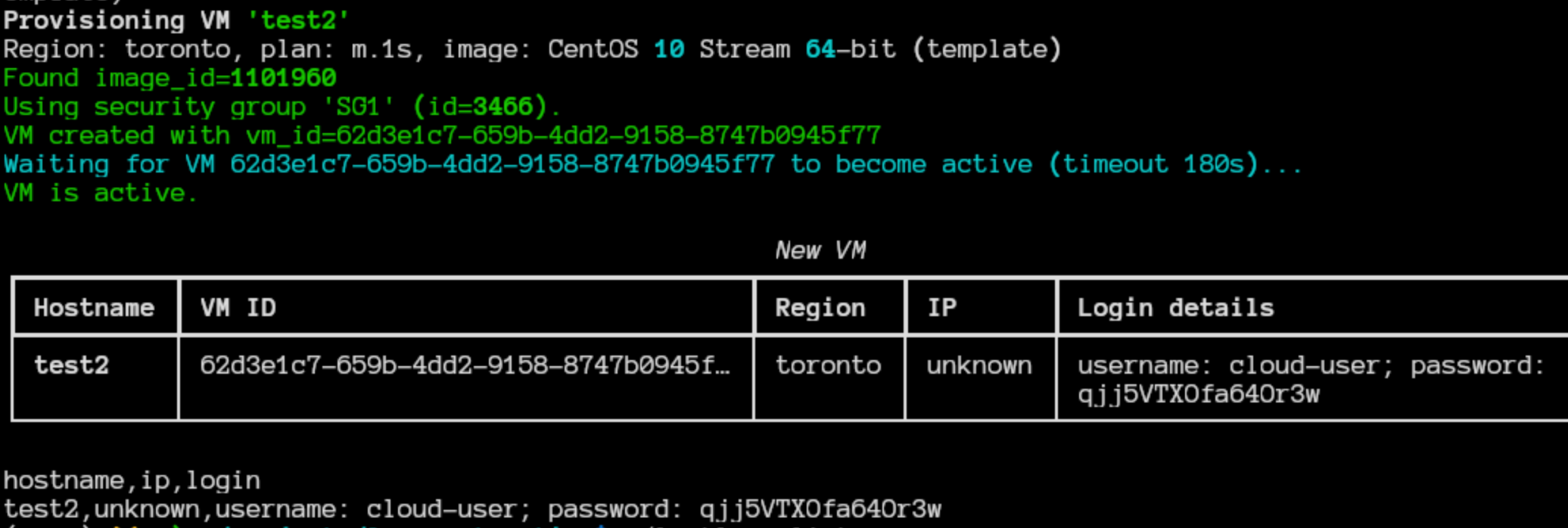
The only aspect I did not automate was DNS. It turns out the commonplace DNS hosting providers either don't have an API or their API is pain. Why not just allow direct editing or uploading of the zone file? So I just sat down and entered the records manually. Click, type, click, click, type… five minutes later, done.
Final surprise
Since my prototype server was working fine, I did not expect any more issues, let alone ones that would leave me puzzled for several hours. My server was running on the lowest possible plan—1024 megs of RAM. This worked fine for me, but the next server I provisioned did not even boot. Same for the next, then the next one worked, and the next didn't… whoa!
Could it be the RAM settings? CentOS does recommend 2048 MB of RAM, but that recommendation really makes sense when you're running a lot of services inside the OS. Not booting at all is not consistent with that kind of a recommendation. But just to isolate the fault, I decided to try on a larger plan and… the OS booted just fine! I did a few experiments and saw that this hypothesis is seemingly consistent: servers on a lower memory setting had small, but non-zero chance of booting, but servers on higher memory just booted fine.
I chalked it up to some weird low memory glitch and decided that the class will run on higher memory servers. They cost more, but we're talking cup of coffee amounts here. When I started to spinning these 30 servers for the class, another surprise awaited: only about 50% of them worked, laying waste on my memory theory.
So what was really going on? It turns out it was a CPU problem, not a memory problem. In the old days, CPUs had visible revisions such as 386, 486, and so on. Operating systems and software would be compiled against a particular model and generally would not work with lower model than specified. With the move to 64-bit processors, everything was folded into the x86-64 architecture which was supposed to be universal. Supposed is the operative word here: modern x86-64 actually does come in several incompatible “microarchitecture levels” (called x86-64-v1, -v2, and so forth). And CentOS Stream 10 requires the v3 level, unlike other current distributions, which are happy with v2. The physical hardware of my VPS provider was a mix of v3 and v2 and that explains why some of the servers booted and some didn't.

These revision levels are quite sneaky. They aren't on the box or on the marketing page of your CPU. To find out which revision is supported on your CPU, you can use a command like ld.so --help. If you only have the CPU name, you need to cross-reference the CPU capabilities from its product sheet with the revision table. For example, the Intel i7-13700K product page says “Instruction Set Extensions … AVX2”, and AVX2 happens to be indicative of the third revision of the architecture (x86-64-v3).
So what happened next? Since I had no control on which physical machine my virtual servers would run (and neither did my VPS host), I reverted my class to CentOS 9. So no weird memory glitches, no ghosts, just a good old-fashioned CPU incompatibility issue. And as soon as I did that, I had 30 servers happily running on the low memory plan and the class went off without a hitch.
What did I learn?
- When a new version of modern OS fails to boot, microarchitecture levels could be the culprit.
- Open-source vendors sometimes change their policies. A community fork usually emerges soon after that.
- For teaching, boring and predictable wins over clever and optimized.